AI-Assisted Simio Simulation Modeling: 5 Practical Use Cases
How to use natural language prompts and AI models inside Simio to build process flows, automate warehouse and AGV route networks, import data tables, learn faster, and diagnose bottlenecks.
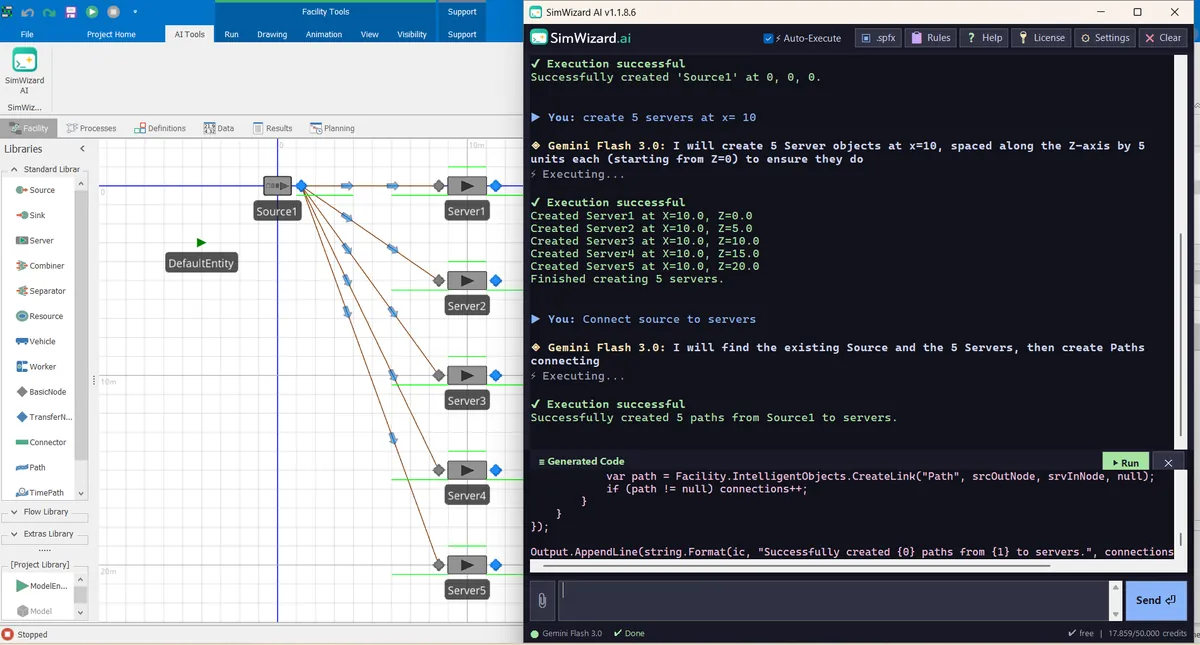
Artificial intelligence is rapidly being integrated into engineering and analytics software—from Microsoft Office tools and business intelligence platforms to MES systems. Today, it is also possible to build and refine digital twins with AI. SimWizard AI, developed as a dedicated add-in for Simio simulation software, brings this capability directly into your modeling workflow.
SimWizard AI connects with leading AI models, including Google Gemini, Anthropic Claude Sonnet and Opus, and ChatGPT Sol, Terra, and Luna. You select the AI model you want from the list and describe the change or analysis you need for your Simio simulation model in natural language. SimWizard translates your request into executable Simio API commands and runs them, freeing you from repetitive manual work, speeding up debugging, and helping you learn Simio faster.
Because SimWizard AI can inspect all objects and property values in your active Simio model, create new objects, and connect them, it operates with full model context within the scope of the Simio API. Both experienced simulation engineers and beginners can benefit from AI-assisted Simio modeling. Let us examine five practical use cases.
1. Build a Simio Simulation Model from a Process Flowchart
Multimodal AI models such as Gemini Pro, Claude Sonnet and Opus, and GPT Sol can process images, understand detailed system descriptions, and generate a starter Simio model suited to your process. You can upload process flow maps or Value Stream Mapping (VSM) diagrams along with text describing the workflow to SimWizard AI and have it build the initial structure.
While this saves substantial setup time, AI-generated models are not guaranteed to be 100% accurate on the first attempt. Standard simulation verification—watching the animation during a run and tracking variable values over time—remains essential. SimWizard AI can also assist during that verification stage, as shown in Section 5.
For best results, provide clear flow maps and select a capable reasoning model. Lightweight models such as Gemini Flash and GPT Luna are better suited for short, simple prompts rather than complex multi-step model generation. For instance, users testing the SimWizard AI trial version can run simple starter prompts with Gemini Flash:
“Create a Source, a Server, and a Sink. Name them Giris, Islem, and Cikis, respectively.”
With Gemini Pro or Claude Sonnet, you can attach a VSM flowchart image and generate a corresponding multi-step simulation model directly in Simio.
2. Automate Warehouse and AGV Route Networks in Large Simio Models
Developing large Simio simulation models—especially warehouse and intralogistics models—involves significant repetitive work. Although Simio’s table-based auto-create feature helps place hundreds of rack modules at exact coordinates, connecting every rack location to aisles and linking opposite junction nodes still requires extensive manual data entry.
In an AGV fleet simulation model used to analyze material delivery to assembly lines, line-side stock locations are rarely spaced at uniform intervals like standard racks. As a result, the vehicle route network often has to be built manually.
With SimWizard AI, you can automate this route-building workflow in seconds. Create a single path along the main aisle used by forklifts, AGVs, shuttles, or operators, populate your target line-side stock coordinates in a table, and run these three prompts in order:
- “Add junction points on the aisle opposite the line-side stock locations.”
- “Connect all the junction points to one another bidirectionally.”
- “Connect all the junction points to the line-side stock locations.”
SimWizard AI generates the junction nodes and bidirectional route network automatically—turning a task that can take days in a large warehouse model into a few seconds.
3. Learn Simio Faster with a Context-Aware AI Modeling Assistant
Simio is a widely adopted discrete-event simulation platform taught at thousands of universities and used by industrial engineers, academics, and consultants. However, mastering Simio requires hands-on experience across diverse projects. A modeler experienced in manufacturing lines may still face a steep learning curve when building a warehouse or service system for the first time. For expert consulting and local support in Turkey, Dijitalis, Simio’s official distributor, provides specialized guidance.
When stuck on a modeling challenge, many users search Google or ask general-purpose AI tools like ChatGPT, Claude, or Gemini. While Simio.com offers extensive written documentation and video tutorials, finding an answer tailored to your exact model takes time. Moreover, general-purpose AI assistants only have surface-level knowledge of Simio and cannot inspect your open model, which often leads to guesswork.
SimWizard AI is purpose-built for Simio. Unlike standalone tools such as Claude Desktop or Codex, it sees the objects and properties inside your active Simio project and can apply changes with a single prompt. You can ask model-specific questions, learn only what your current simulation requires, and practice “vibe modeling”—building and learning Simio interactively through natural language commands:
“In my model, customer arrival frequency does not follow a constant distribution. Instead, it varies, with peaks at certain times of day, as shown in the attachment. How can I model this in Simio?”
4. Import Excel and CSV Data Tables into Simio Automatically
Simio supports importing data from Excel and CSV files into internal model tables, but configuring the schema manually is strict and error-prone. Columns must be created in Simio in the exact same order and data format as the source spreadsheet, without spaces or unsupported special characters in headers. Even a single character mismatch will block the import, turning wide spreadsheets into hours of low-value setup work.
SimWizard AI simplifies Simio data table creation. Upload your .csv file or paste a table screenshot directly with Ctrl+V, then enter:
“The attached screenshot / CSV file contains the table structure I want to create in Simio. Can you create this table in Simio together with the data it contains?”
5. Simio Model Verification, Validation, and Bottleneck Analysis
Building a complex simulation model is only the first phase; verification, validation, and results analysis are equally critical. During verification and validation, you confirm that the model behaves according to your inputs and system logic. During results analysis, you determine whether an unexpected bottleneck stems from a modeling bug or true system behavior.
Consider a large automated warehouse simulation that runs smoothly until hour 16, when severe congestion suddenly builds up and never clears before hour 24. Instead of manually auditing every schedule, resource, and property, you can ask SimWizard AI to inspect both your model inputs and simulation results:
“Whenever I run the warehouse model, the system becomes congested at 16:00. Is there an error in the model? What causes this congestion?”
SimWizard (Gemini 3.1 Pro): “There is no error in your model. The Workstation that enables the flow of entities in the model takes a short break at this time. However, because demand is very high at that hour, it immediately causes the system to become congested.”
From AI Modeling Support to Faster Simulation Decisions
Across flowchart-to-model generation, warehouse route automation, interactive learning, data table setup, and bottleneck diagnostics, AI-assisted Simio modeling helps users at every skill level. Beginners flatten the Simio learning curve through vibe modeling, while experienced engineers eliminate repetitive setup and verify complex models with greater confidence.
Integrating AI into simulation does not replace simulation engineers—it increases their throughput and expands where simulation can be applied. As modeling becomes faster and more reliable, teams can deliver more digital twin and process improvement projects in less time.
Ready to try AI-assisted modeling in Simio? Download SimWizard AI to test these prompts on your own models, view plans and pricing, or browse more Simio modeling use cases.
Frequently Asked Questions
Can AI build a Simio simulation model from a flowchart image?
Yes. Using multimodal models such as Gemini Pro, Claude Sonnet or Opus, or GPT Sol inside SimWizard AI, you can upload a process flow map or VSM image along with a description to generate a starter Simio model. Standard verification is still recommended after generation.
How is SimWizard AI different from using ChatGPT or Claude directly for Simio?
General-purpose AI chats cannot see your open Simio project and often guess Simio property names. SimWizard AI runs as a Simio add-in, inspects all objects and properties in your active model, and executes changes directly via the Simio API.
Can SimWizard AI help debug bottlenecks and unexpected simulation results?
Yes. SimWizard AI can examine your model inputs, schedules, and run results to distinguish modeling errors from real system bottlenecks—such as a workstation break coinciding with peak arrival demand.